Where Is Your Database Really Spending Its Time?
Have you ever investigated which SQL statements are unexpectedly slowing down your database?
With the IBExpert Full Version or Day Edition, you can see what is happening directly on the Firebird server. Simply right-click your registered database, select Start trace session, and enable tracing for your current connection. You can then follow statement preparation and execution, stored procedure calls, and trigger activity as they happen.
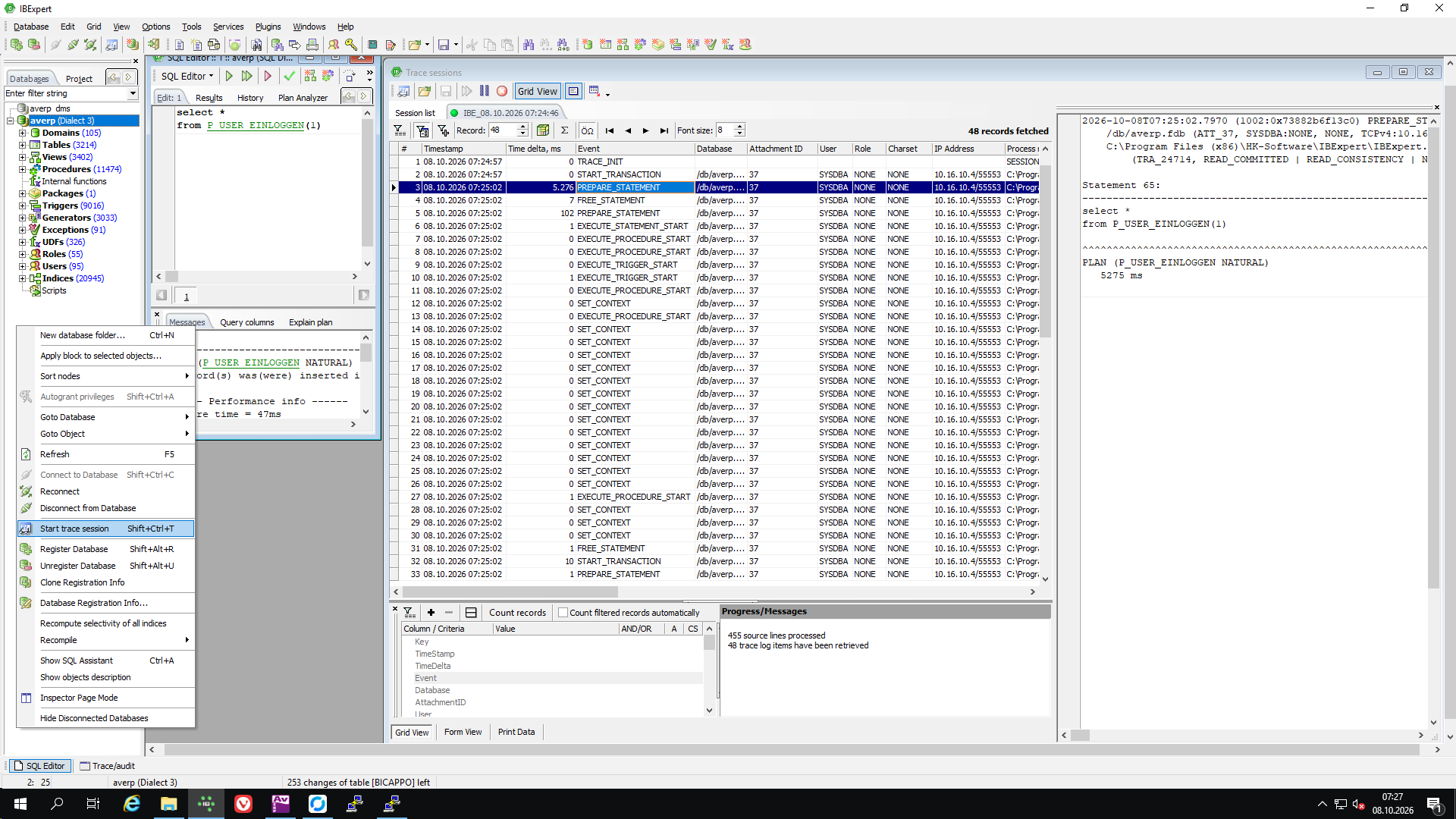
In the example shown, the seemingly unremarkable stored procedure P_USER_EINLOGGEN takes more than five seconds just to prepare the call, before execution even begins. A simple-looking SQL statement can hide a surprising amount of work.
These detailed trace results also give AI platforms the evidence they need to help you investigate performance problems and suggest targeted improvements. Without tools that reveal what the server actually does, even AI-assisted optimisation can quickly reach a dead end: the SQL text alone often does not explain where the time goes.
During our IBExpert Hotline Sessions, we can investigate these delays together, identify unexpected calls and dependency chains, explain why they occur, and work on ways to optimise your database.
Bring your trace results, and let’s find out where the time really goes.
IBEScript.exe 64 Bit for Windows and Linux - Beta testers wanted!
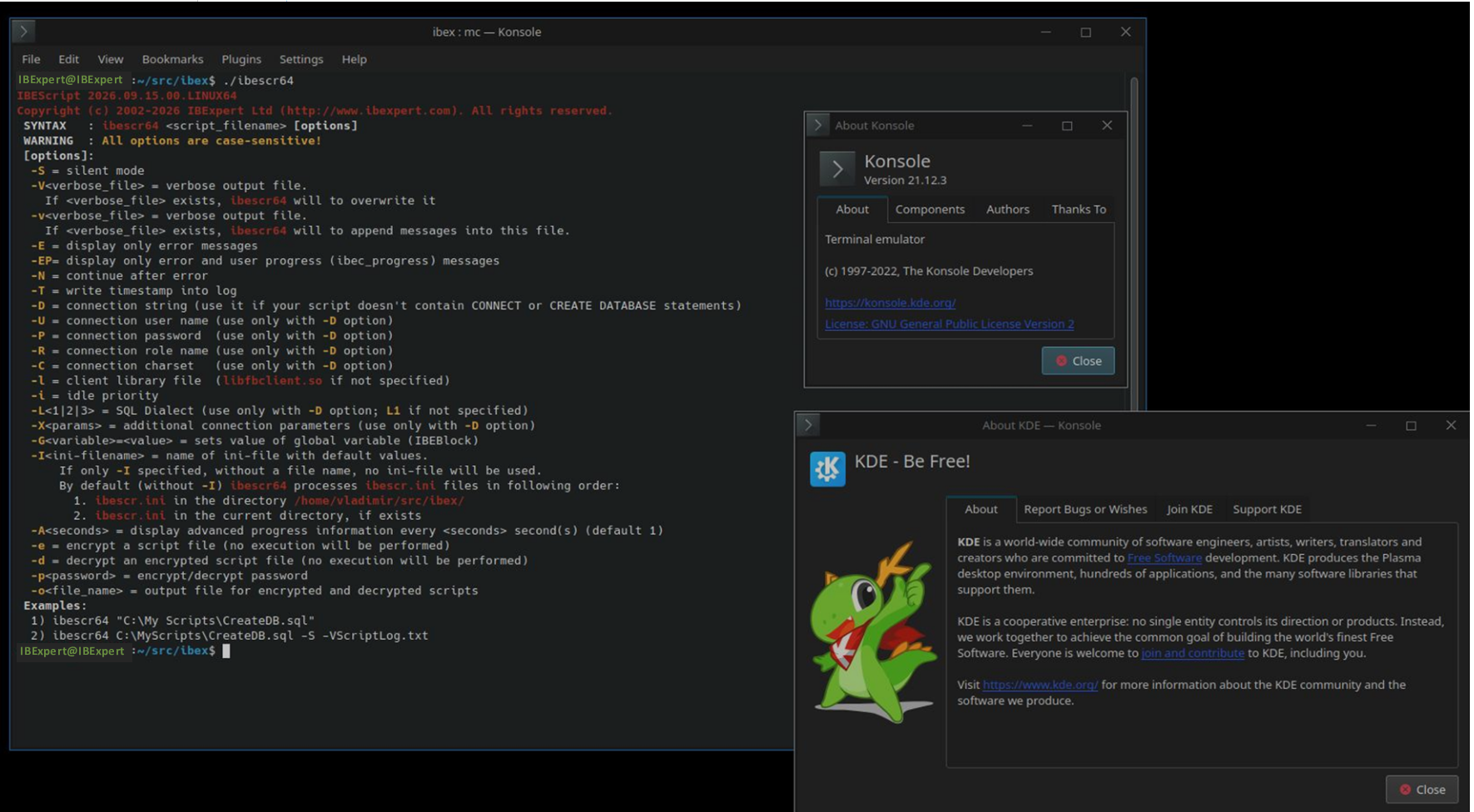
We are nearing completion of our project “IBEScript.exe 64 Bit for Windows and Linux” and are now looking for beta testers to help us with the final testing phase.
The current beta version has already been ported to native 64-bit versions for Windows and Linux. Since many of the same functions are also used in the IBExpert IDE, the project has evolved into a broader effort that will ultimately provide a replacement for the existing ibexpert.exe for these platforms as well.
Here is a preview of the current non-public beta version:
Interested in becoming a beta tester?
If you would like to test the current beta version, please register here:
https://signal.me/#eu/lM3apdmvOoskLavQ965m9R0lXk8XRww0nfUwB6lrVP56oaKX619Is4D0yFxYhvTL
Please include a brief description of who you are, how you plan to test the software, and which platforms and environments you intend to use.
Your feedback will help us identify and resolve any remaining issues before the public release.
We are planning to publish the new IBEScript version later this year, with the new ibexpert.exe IDE hopefully following in the first half of 2027.
We look forward to hearing from you and welcoming you to our beta testing team!
Firebird Write Operations
Why the order of write operations is so important for Firebird
Holger Klemt, September 2026
The reliability of a Firebird database does not depend on Firebird alone. It is equally important that the underlying operating system and storage system execute and acknowledge write operations in the way the database expects.
Firebird is designed to write changes to storage in a defined and carefully coordinated order. In particular, when Forced Writes are enabled, Firebird ensures that critical changes have actually been written to persistent storage before subsequent operations are considered successfully completed.
Caches and additional storage layers
Modern operating systems, RAID controllers and storage systems attempt to optimize write operations for performance reasons. For example, write operations may be collected, combined or passed to the physical storage device in a different order.
This is generally useful and usually unproblematic for normal file access. For a database system, however, it is essential that so-called flush or synchronization requests are reliably passed through all layers down to the actual persistent storage medium.
Additional layers between Firebird and the physical storage device can therefore become critical, for example:
- Host or controller caches
- RAID and storage virtualization
- Cluster file systems
- Block-level replication
- SAN or NAS systems
- Snapshots and other virtualization layers
- Write caches that are not protected by battery backup or flash-based protection
The problem arises in particular when one of these layers reports a write operation as completed even though the data has not yet been permanently stored.
What can happen during a crash
In the event of a power failure, kernel crash or hardware failure, write operations that have already been acknowledged may therefore be lost.
This becomes particularly problematic when a later database state has already reached the storage device while related earlier changes are still waiting in a cache. This can result in information within the database file that is no longer consistent.
Firebird’s carefully designed write strategy is intended to prevent exactly these situations. However, this requires the operating system, drivers, controllers and storage system to correctly implement the corresponding synchronization requirements.
Disabling Forced Writes may therefore significantly improve write performance, but at the same time it removes an important layer of database protection.
Linux Is not automatically protected against these problems
Linux file systems such as ext4 provide mechanisms for controlling the order and durability of write operations. However, this does not automatically mean that every underlying storage configuration provides the same guarantees.
As soon as additional cluster, mirroring, RAID or virtualization layers are involved, it must be ensured that flush operations and write barriers are actually passed through to persistent storage.
For database systems, the more important question is therefore not whether Windows or Linux is being used, but whether the entire storage stack reliably provides the guarantees required by the database system.
A real-world example
Several years ago, a serious failure occurred in a business-critical Firebird environment managed by us. The database was hosted on an externally implemented Linux cluster and storage solution.
Following an error, not only the production database but also the copy created at storage level was affected. Restoring the system required extensive analysis and repair work.
The architecture was subsequently changed. Since then, redundancy has no longer been provided through transparent mirroring of an open database file, but through replication at the Firebird database level to independent server systems. This architecture has been operating reliably in that environment for many years.
Redundancy should ideally be implemented at database level
For Firebird systems, we therefore prefer storage architectures that are as simple and transparent as possible.
Where possible, redundancy and high availability should be implemented in such a way that two independently operating Firebird servers each maintain their own local database file, with synchronization being controlled at the database level.
This approach offers several advantages:
- Each Firebird server controls its own database file.
- Storage problems affecting one system are not automatically transferred to the second database file.
- The number of additional caching and virtualization layers is reduced.
- Problems are easier to analyze and isolate.
- Firebird's write mechanisms, which are essential for data integrity, remain intact.
Security and performance are not mutually exclusive
Strictly maintaining the required order of write operations inevitably introduces a certain amount of latency. In applications with very intensive write activity, this latency can be clearly measurable.
However, this additional latency is not unnecessary performance loss. It is an essential component of transaction safety.
When optimizing a Firebird server, the goal should therefore not be to circumvent these safety mechanisms. A better approach is to design the hardware and storage architecture in such a way that synchronous write operations can be completed as quickly as possible.
A fast database requires fast storage. A reliable database, however, requires storage whose claims regarding successfully stored data actually hold true.
Firebird Database Replication
Reliable, Near-Real-Time Synchronization for Mission-Critical Systems
Holger Klemt, August 2026
Modern applications increasingly require databases to remain available across multiple locations, servers, and environments. Whether the goal is high availability, migration from a desktop application to a web-based system, distributed databases, or continuous synchronization between data centers, reliable database replication is a critical component.
Our Firebird replication solution has been developed for precisely these scenarios. It combines transaction-safe replication, near-real-time synchronization, one-to-many replication, and support for large Firebird databases — while allowing replication to be introduced into an existing production environment without taking the database offline.
Designed for Firebird
The replication framework supports Firebird 2.5 and newer versions, including Firebird 4, Firebird 5 and current Firebird 6 databases.
A key advantage is that replication is implemented directly at the database level using active triggers and a transaction log. Changes made to the source database are recorded as transactions and can subsequently be transferred to one or more target databases.
This architecture ensures that changes are not lost simply because the network connection or replication process is temporarily unavailable.
Replication without production downtime
One of the most important requirements in a migration or high-availability project is the ability to activate replication without interrupting the running application.
Our replication process is designed for exactly this purpose.
Once replication is initialized, the required triggers begin recording INSERT, UPDATE and DELETE operations in a dedicated transaction log. The production database continues to operate normally.
The initial synchronization can then be performed by creating a backup of the master database and restoring it on the target server. This process can also be performed without taking the production database offline.
After the target database has been initialized, the replication process transfers all transactions that occurred while the backup was being created and subsequently continues with new transactions.
Transaction-safe replication
Reliability is at the heart of the architecture.
Imagine that the master database has accumulated 100 transactions waiting to be replicated. If the network connection fails after only part of the data has been transferred, the remaining transactions are not lost.
They remain in the transaction log and are transferred during the next replication operation.
The replication process therefore does not depend on a permanently available network connection. A target server can even be unavailable for days or weeks while the master database continues to collect the transactions required for synchronization.
When the target becomes available again, replication can continue from where it stopped.
One-to-many replication
The architecture also supports one-to-many replication.
A single master database can replicate its data to multiple target servers. Each target is tracked independently.
For example:
Master Server → Slave 1
Master Server → Slave 2
Master Server → Slave 3
If Slave 2 is temporarily offline, replication to Slave 1 and Slave 3 can continue normally. The transactions required for Slave 2 remain available on the master until that target reconnects.
This makes the architecture suitable for distributed systems where individual locations may have unreliable network connections or temporarily unavailable servers.
Multi-master replication
Depending on the database structure, the technology can also support multi-master replication.
In this configuration, several servers can act as master databases and exchange changes between one another.
However, multi-master environments require careful consideration of the database design, particularly primary-key generation. For example, automatically generated keys must be designed so that records created independently on different master servers cannot produce conflicts.
Where necessary, database metadata and application logic can be adapted to support this architecture.
Near-real-time synchronization
The replication process is designed for near-real-time operation.
In a typical environment, transactions are transferred continuously through a push/pull process. The actual latency depends on server performance, transaction volume and network conditions.
In one large distributed deployment, changes were typically visible at remote locations in less than 10 seconds. Even under periods of very high system load, latency generally remained within approximately one minute.
Locations with slower or unreliable Internet connections could continue operating locally. Once connectivity was restored, accumulated transactions were synchronized automatically.
Proven with large and distributed Firebird installations
The technology has been used in demanding real-world environments involving large databases and geographically distributed systems.
One particularly extensive project involved:
- 9 central servers
- 6 different data centers and cities
- Approximately 225 Firebird databases at individual locations
- Approximately 500 GB in the largest central database
- Around 2 billion records in the largest database
- Approximately 5–6 million INSERT, UPDATE and DELETE operations per day
- Near-real-time synchronization between the central systems and remote locations
The individual remote databases contained subsets of the central data and synchronized local changes back to the central infrastructure.
Despite unreliable network connections at some locations, the replication architecture ensured that transactions remained available until they could be transferred successfully.
Handling very large databases and BLOB data
Large Firebird databases can contain substantial amounts of BLOB data, particularly in applications such as healthcare, document management, imaging and archive systems.
In one implementation, the overall database environment reached approximately 7 TB, including transaction logs and annual BLOB databases.
For very large datasets, separating historical data into dedicated databases can provide significant advantages.
For example, annual transaction or BLOB databases can be closed and made read-only at the end of a financial year. They remain accessible via the main database, but no longer increase the size of the active production database.
This approach can significantly simplify and accelerate future backup and restore operations.
No single point of failure in the replication process
A temporary failure of a target server or network connection does not stop the master database from recording changes.
This is particularly important for distributed installations.
A remote server may be restarted, disconnected, or unavailable for an extended period. Once it becomes available again, the replication process can continue using the transactions that accumulated while it was offline.
The result is a replication architecture designed around reliable, post-event synchronization without data loss, which does not require all servers and network connections to be permanently available.
Database metadata plays a crucial role
Reliable replication starts with a suitable database design.
Ideally, every table that needs to be replicated should have a primary key or at least a suitable unique index.
Primary keys should also be reasonably compact. Extremely complex primary keys spanning a large number of columns can make replication and application development unnecessarily complicated.
Tables without primary keys may require an alternative identification mechanism. Depending on the database structure, a different technology based on Firebird's RDB$DB_KEY can be considered.
For complex environments, the database metadata can be analyzed before implementation to determine the most appropriate replication strategy.
Continuous replication with minimal maintenance
Once implemented, the replication system is designed to operate largely in the background.
In many installations, no regular manual maintenance is required.
Nevertheless, database administrators may occasionally perform extensive metadata changes or structural modifications that require replication to be reinitialized or adjusted.
For such situations, remote technical assistance can be provided through a prepaid support and hotline system. This allows administrators to request assistance when required rather than maintaining a permanent support contract solely for occasional replication operations.
Implementation and migration
Every replication project is different. Database size alone is not sufficient to determine the implementation effort.
Before a project begins, we therefore recommend analyzing:
- The database metadata
- Primary keys and indexes
- Database statistics
- Number and size of databases
- Transaction volume
- BLOB usage
- Network topology
- Number of replication targets
- Required replication direction
- Expected availability and recovery requirements
A metadata-only backup is often sufficient for the initial technical assessment. This allows the database structure to be reviewed without providing access to sensitive customer data.
Implementation and training can be carried out entirely remotely – even for customers in distant time zones.
Source code and customization
The replication framework can be delivered together with its source code, allowing customers to understand, adapt and integrate the solution into their own environment.
This is particularly valuable when replication forms part of a larger migration project, such as moving an existing desktop application to a web-based architecture while keeping the existing production system operational during the transition.
A practical foundation for system migration
Database replication is especially valuable when an organization needs to modernize an existing application without accepting prolonged downtime.
For example, a healthcare information system (HIS) and its associated image database may need to remain continuously available while the underlying application is migrated from a desktop architecture to a modern web application.
A transaction-based replication layer can provide a bridge between the existing and new environments, allowing both systems to operate while data is continuously synchronized.
This can substantially reduce migration risks and enable a controlled transition rather than a disruptive "big bang" migration.
A solution built on real-world experience
The architecture described here is not limited to laboratory scenarios. It has been used for more than a decade in demanding production environments with geographically distributed Firebird databases, large transaction volumes, unreliable network connections and substantial amounts of data.
The combination of transaction logging, trigger-based change tracking, push/pull replication and independent target tracking provides a robust foundation for high-availability and distributed Firebird environments.
For organizations planning a Firebird migration, high-availability project, distributed database architecture or near-real-time synchronization solution, the first step is a technical review of the existing database environment.
With the database metadata and current database statistics available, a realistic implementation plan, replication architecture and project-specific quotation can be prepared.
Newsletter 2026/07
You can find a German-language copy of the newsletter online here
Current IBExpert version 2026.07.26
This version includes further adaptations and optimisations to new Firebird 6 features, along with minor bugfixes and improvements.
Download here: https://ibexpert.net/dlc
New: RemoteDBA Service is also available for third-party hardware!
Boost the performance of your existing Firebird server hardware or VM with the IBExpert RemoteDBA Service – find out more here. This service is available worldwide.
Just how powerful is a Firebird server really?
Before the first users start complaining about slow response times:
Test your server with the IBExpert Benchmark – you’ll see the result at a glance.
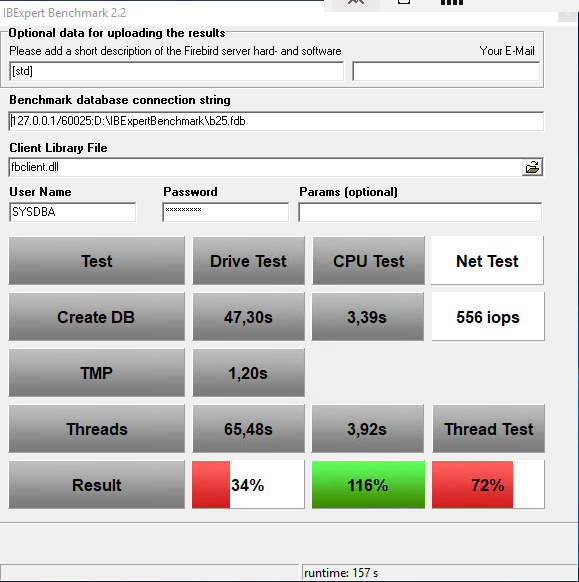 A typical Firebird server in a customer environment |
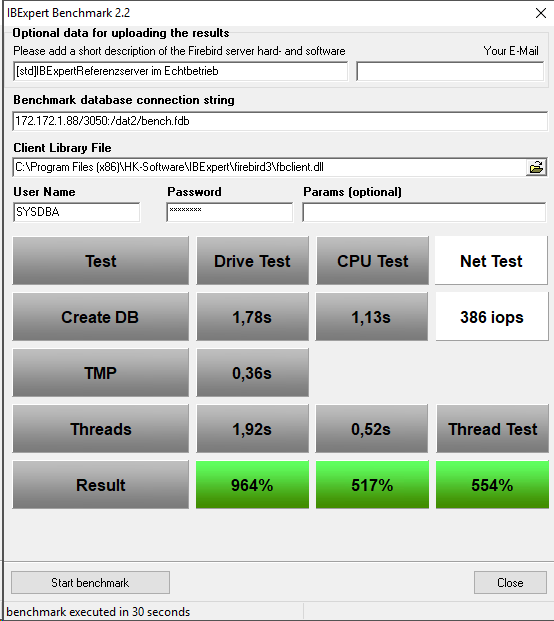 IBExpert Firebird IFS Reference Server |
The IBExpert Benchmark is particularly valuable for software vendors and support teams who need to analyse performance issues reported by customers and objectively determine whether bottlenecks are caused by the server hardware.
Try it for free
Download the free IBExpert Benchmark and test your server in just a few minutes:
https://ibexpert.net/benchmark/setup_benchmark.exe
With a current IBExpert Developer Studio subscription or the IBExpert Day Edition, the Extended and XXL benchmarks are also available.
Up to 30 times better performance for Firebird databases
The IBExpert Benchmark highlights the significant difference: depending on the system being compared, our specially developed Firebird IFS servers achieve up to 30 times higher overall performance than typical standard servers.
Ideal for large databases, large numbers of users and demanding applications – without the need for any changes to your software.
High-performance Firebird IFS servers
Optimise the performance, reliability and security of your Firebird databases with our dedicated Firebird IFS servers. Our solution is complemented by a 4-year hardware maintenance and RemoteDBA service, which includes proactive monitoring, regular backups and competent support.
Find out more about technical specifications, configuration options and support services: https://ibexpert.net/cms/firebird-ifslr-server
Further information about our servers: IFS Firebird Server – consistently designed for database performance
Boost the performance of your existing Firebird server hardware or VM with the IBExpert RemoteDBA service
Would you like to use IBExpert RemoteDBA but already have your own server? It is often not necessary to replace all your hardware. Following an analysis and a practical benchmark, we will, if required, recommend specific additional hardware that you can then purchase yourself.
This allows you to optimise your existing server cost-effectively and significantly speed it up.
This service is available worldwide.
Find out more about IBExpert RemoteDBA here: https://ibexpert.net/cms/ibexpertremotedba